
Get Started
Get started by installing the extension and connecting to your server.
You can also view the features and screenshots 📸.
Install
Microsoft Edge, Opera, Brave, Chromium, Vivaldi, Waterfox, and More.
Available for all major browsers including Firefox Android.


View QR Codes 📸
Setup
Manual Setup
- Open the Extension Options (1 of 3 ways).
- Click the Toolbar Icon > Settings Icon.
- Use the Right Click Menu > Settings.
- Use the Keyboard Shortcut for Settings.
- Enter your Zipline URL and Auth Token.
❔ HELP
If you have any trouble getting started, support is available.
Automatic Setup
WARNING
You must use Manual Setup starting with Zipline v4.4.1 or later.
View Automatic Setup
- Navigate to your Zipline Dashboard.
- Activate the Popup (1 of 3 ways).
- Click the Toolbar Icon.
- Use the Right Click Menu.
- Use the Keyboard Shortcut.
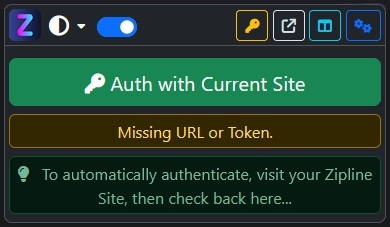
- Click Authenticate with Current Site.
Server
This guide assumes you have a diced/zipline server setup and accessible.
Otherwise, you can get started here.
Only Version 4 is supported.